| ||||||||||
| ||||||||||
| ||||||||||
| ||||||||||
| ||||||||||
|
![]() gpuedit
gpuedit
![]()
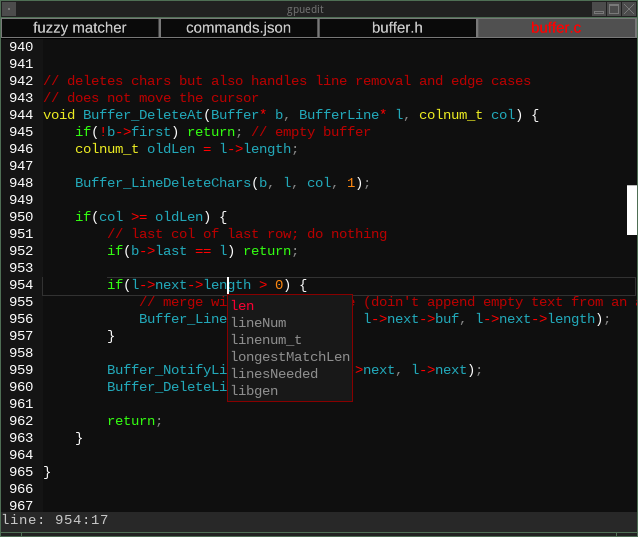
I used to use KWrite, but the maintainers of the QT and KDE projects kept breaking it in ways that make it unusable without running the full KDE bloatware desktop. So out of frustration in having to continuously kick KWrite and look for obscure workarounds, I wrote my own editor that only depends on having an OpenGL 4.4 capable gpu and a couple basic system libaries. It's fast, and lean, and has little more than the features that I personally use, at least at the moment.
While gpuedit is aimed at my personal preferences, it is intentionally designed to be as agnostic as possible to the various tech religions surrounding editors and inputs. You can use multiple panes, or not. You can use multicursor, or not. You can use VIM mode, or configure it to act like emacs, or even choose a sane, normal, modern input style if you so desire.
GPL 2 licensed.
Features
- Complete configurability of all user interactions and commands in one simple(-ish) JSON file.
- Tabs and panes
- Fuzzy-matching file name searcher within git repos and regular folders
- Grep-matching file contents searcher within git repos and regular folders
- Undo/Redo that usually works
- Autocomplete based on word frequency within the document
- Command recording and playback (like macros in Excel)
- Multiple cursors
- Find/replace powered by libpcre
- VIM-style input mode, if you hate your finger joints and want arthritis
- All the usual basic features of a text editor
- Various bugs, lest you get complacent
Currently supported syntax highlighters
- C (not C++)
- GLSL (uses the C highlighter)
- Lua
- JS (used for JSON files too)
- Python
Repos
GithubNotabug (Currently down due to the Goddamn AI scrapers. Fuck Sam Altman.)
Gitlab
Codeberg
Installation
Requirements
- Linux 2.6+
- A reasonably modern CPU.
- OpenGL 4.4+ capable hardware and drivers.
- Note that some integrated Intel devices are capable of running gpuedit despite claiming to only support OpenGL 3.0, but with sub-optimal performance.
- Will eventually support a Vulkan option (the gui toolkit has a working Vulkan fork in another project), but not yet.
Install
https://github.com/yzziizzy/c3dlas symlinked assrc/c3dlas https://github.com/yzziizzy/c_json symlinked assrc/c_json https://github.com/yzziizzy/sti symlinked assrc/sti - Dependencies on apt-based distros:
sudo apt-get install libx11-dev libglew-dev libfreetype6-dev libfontconfig1-dev libpng-dev libpcre3-dev - Optional Dependencies:
sudo apt-get install libjpeg-turbo8-dev alsa-source - Compile the parser generator:
cd src/sti/parser/ && ./build.sh - For each highlighter in
src/highlighters/ :./build.sh - Copy or symlink the .so to
/usr/local/lib/gpuedit/highlighters/
- Build gpuedit:
./build.sh -cr
Configuring
Most configuration happens in
Each command entry in the config file has certain standard fields:
General options and theming can be found in
Highlighter color config files are also located in
Note that all configuration files are loaded by c_json which is extremely flexible in formatting. Single quotes are permitted, and string values without
whitespace or leading numbers can omit quotes altogether.
| Errors? Email me. No, I don't use Discord. |
Guaranteed 100% Slop Free
Genuine human errors gratis Proudly made with m4 |

|